Telehealth Ad Lens for the Meta Ad Library
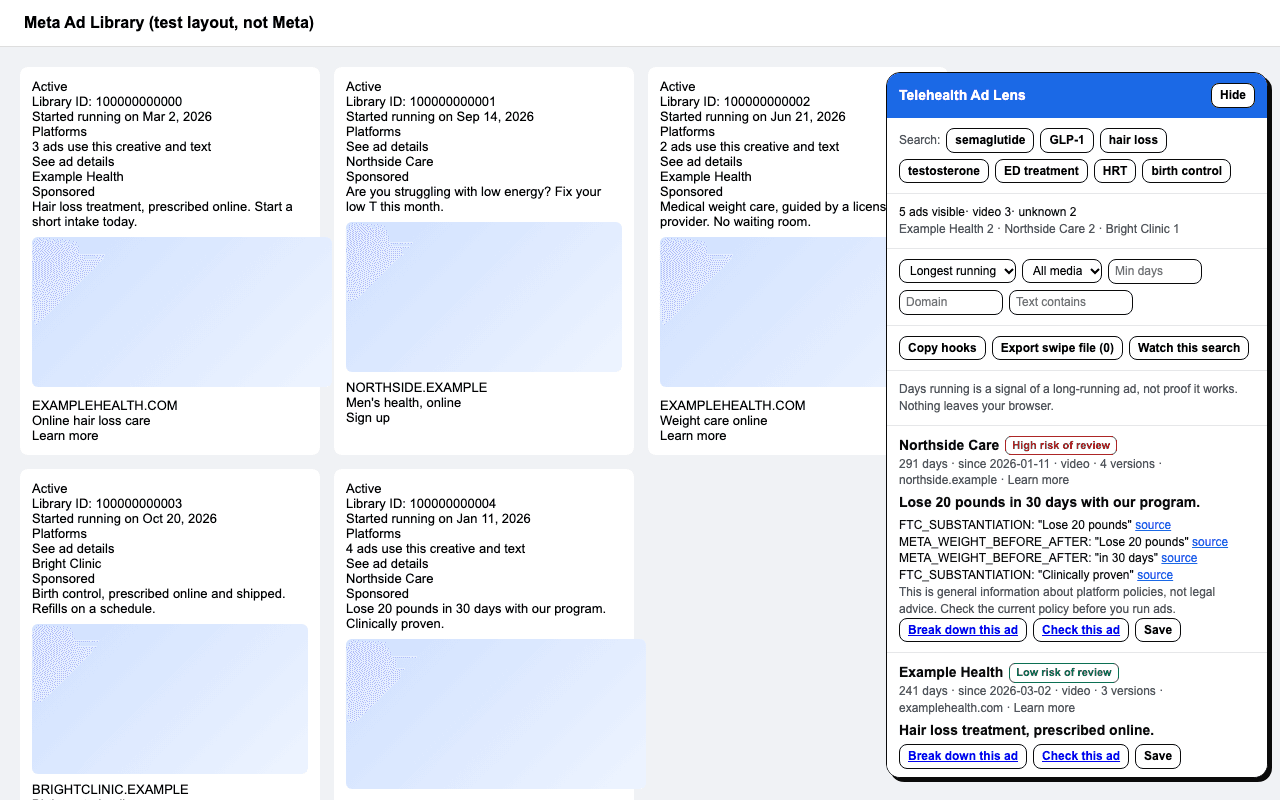
A free browser extension for Chrome, Edge and Firefox. It adds a panel to the Meta Ad Library that sorts ads by days running, flags health ad review risks and saves a swipe file. No account, no tracking, nothing leaves your browser.
Store listings are on their way. Until then, install it from the files below.
What it does
- List the ads on the page
- Advertiser, Library ID, start date, days running, media type, versions, primary text, call to action and landing domain.
- Sort by days running
- Long-running ads are the closest public signal of what works. A signal, not proof.
- Filter
- By video, image or carousel, by minimum days running, by landing domain, or by text.
- Telehealth searches
- One click for semaglutide, GLP-1, hair loss, testosterone, ED, HRT or birth control. These only change the Ad Library URL.
- Review-risk badge
- Each ad gets a low, medium or high review-risk badge from the same rules as the ad compliance checker. Click it for the flagged phrases and their sources.
- Check an ad
- Opens the free compliance checker with the text filled in. Nothing is sent until you click.
- Swipe file
- Save ads with tags and boards and export CSV in the columns of the swipe file template. Text and links only, never media.
- Watch a search
- Save the ads you have seen; next time, new ones are highlighted. The comparison happens in your browser.
- Hooks and counts
- Copy the first line of every ad on the page, and see counts by advertiser and media type.
Install
- Download and unzip the file for your browser from the project's release files.
- Chrome or Edge: open the extensions page, turn on developer mode, choose “Load unpacked” and pick the unzipped folder.
- Firefox: open about:debugging, choose “This Firefox”, then “Load temporary add-on” and pick the manifest file.
- Open the Meta Ad Library and search. The panel appears on the right.
What it does not do
- It does not download images or videos.
- It does not fetch Ad Library pages in the background or click anything for you.
- It does not say an ad is allowed. The badge is a review-risk signal from public rules, not legal advice.
Questions
- Is Telehealth Ad Lens made by Meta?
- No. It works with the Meta Ad Library but is not affiliated with or endorsed by Meta.
- Does it download ads?
- No. It reads the text on the page you are viewing and never downloads images or videos.
- What data does it collect?
- None. There is no account and no analytics. Your swipe file and watched searches are stored in your browser.
- Why do some ads show no text?
- The Ad Library hides some health ads behind an age check for logged-out visitors. The extension only reads what the page shows.
Read the Ad Lens privacy policy. Related free tools: the ad compliance checker, the Ad Library search links and the swipe file template.